

Week 1 in our Internet of Things series was What is the Internet of Things? Week 2 was Home Safety - Devices That Prevent Disasters Before They Happen. Week 3 was Simple Smart Home Devices That Help You Stay Independent. Week 4 was Stay Independent Longer - Smart Health Devices Worth Your Trust. Week 5 was Easy Video Calling Devices That Keep Grandkids Close.
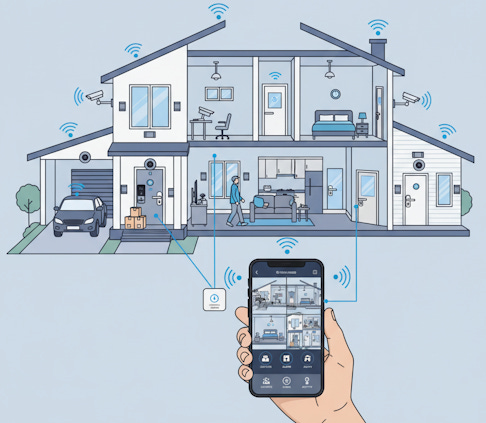
Your house doesn’t need to be a mystery when you’re away anymore. Smart security systems put real control in your hands, whether you’re at the grocery store or visiting family across the country.
The beauty of these systems isn’t just that they watch your home. They let you actually do something about what you see. Lock a door you forgot about. Check who’s at the front step. Turn on lights to make it look like someone’s home. All from your phone.
Join TheSeniorTechie and help make technology accessible for every senior. Paid subscribers get full access to Premium Guides - including a monthly deep dive into brain health - plus LIFETIME access to free tech support from our partner Tech Maid.
What Makes a Security System “Smart”
A smart security system connects to your home’s internet and talks to your phone. That’s really the core of it.
Traditional systems just made noise when something happened. Smart ones send you a message, show you what’s going on, and let you respond right then. You’re not waiting to get home to figure out if that alarm was your cat or an actual problem.
Most systems work through an app on your phone or tablet. The app becomes your control center for everything. You can watch camera feeds, lock doors, adjust how sensitive your motion sensors are, and set up schedules for when things should happen automatically.
The Main Components You’ll Actually Use
Cameras That Show You What’s Happening
Smart cameras are probably the most straightforward piece of the puzzle. They record video and let you watch it live from your phone.
The newer ones can tell the difference between a person, a car, a package, or just your neighbor’s dog wandering through. That means fewer false alarms about nothing. Some outdoor cameras even have built-in sirens and spotlights that can turn on automatically when they detect someone suspicious.
You can place cameras indoors to check on pets or see if you left the stove on. Outdoor cameras watch your driveway, backyard, or wherever you want coverage.
Smart Doorbells That Do More Than Ring
Video doorbells have gotten really popular because they solve an annoying problem. You can see who’s at your door without getting up, or even when you’re not home.
They work just like a regular doorbell, except they have a camera and connect to your phone. When someone presses the button, you get an alert and can see them on your screen. Many let you talk back through a speaker, which is handy for telling delivery people where to leave packages.
The AI features in newer models can spot when a person approaches, even before they ring. Your porch light can turn on automatically. It’s that kind of coordination between devices that makes the “smart” part work.
Locks You Control Without Keys
Smart locks let you lock or unlock your doors from your phone. You don’t need to wonder if you remembered to lock up when you left.
They’re also great for giving temporary access to people. If a friend is stopping by to water your plants, you can unlock the door for them remotely, then lock it again after they leave. Or set up a code that only works for certain hours.
Some folks worry about security with smart locks, but they typically have strong encryption and send you logs of who opened the door and when. That’s actually more information than a regular lock gives you.
Motion Sensors and Window Contacts
These are the behind-the-scenes workers. Motion sensors detect movement inside your home. Window and door contacts tell you when something opens or closes.
What makes them smart is how they connect to everything else. When a motion sensor detects movement, it can trigger your cameras to start recording, turn on lights, and send you an alert all at once. You can program different responses for different situations.
How Everything Talks to Each Other
The real power shows up when your devices work together. This is called integration, and it’s where things get useful.
Most systems connect with Amazon Alexa, Google Assistant, or Apple HomeKit. That means you can use voice commands to arm your system, check camera feeds on a smart display, or control everything through whatever smart home setup you already have.
Let’s say your video doorbell spots a person at your front door. Your system can automatically turn on the porch light, start recording on your outdoor camera, and send you an alert. You didn’t have to program each device separately. The system knows they should work together.
Z-Wave is another technology worth knowing about. It’s a wireless protocol that lets different brands of smart devices talk to each other. Systems like Vivint and Abode support Z-Wave, which means you can mix and match devices from different manufacturers.
Controlling Your System From Anywhere
The mobile app is where you spend most of your time with these systems. Good ones are straightforward and don’t require a manual to figure out.
You can watch live camera feeds, get instant notifications when something happens, and control every device from one screen. The ADT+ app, for example, lets you view cameras, adjust sensitivity settings, and create automations without needing a separate control panel in your house.
Some systems let you create modes for different situations. “Away Mode” might arm all your sensors, turn on certain lights at random intervals, and set cameras to their most sensitive settings. “Home Mode” might only monitor doors and windows. You can switch between modes with a single tap.
The better apps also keep a timeline of events. You can scroll back through the day and see when doors opened, when motion was detected, or when cameras started recording. It’s reassuring to have that history.
Setting Up Automations That Actually Help
Automations are just if-then rules. If this happens, then do that.
Here’s a practical one: if your smart lock shows someone unlocked the front door between 3pm and 4pm on weekdays, turn off the alarm automatically. That’s probably your grandkid getting home from school. No need to manually disarm the system every day.
Or try this: if motion is detected in your driveway after 10pm, turn on all your outdoor lights and start recording on all cameras. That’s more response than you’d get from a regular motion-sensor light.
The trick is starting simple. Pick one or two automations that solve real annoyances in your day. You can always add more as you get comfortable with how they work.
Professional Monitoring vs. Self-Monitoring
You’ve got two main approaches here. Professional monitoring means a company watches your system 24/7 and calls police if something serious happens. Self-monitoring means you get the alerts and decide what to do.
SimpliSafe’s Active Guard monitoring is an interesting middle ground. It uses AI and live agents to spot intruders in real time, then shouts warnings through your cameras and calls for help if needed. They’re trying to stop break-ins before they happen, not just record them.
Professional monitoring costs extra each month, usually $15 to $60 depending on the service level. Self-monitoring is often free after you buy the equipment, but you’re responsible for checking alerts and responding.
Which one’s right depends on your situation. If you travel a lot or don’t always have your phone nearby, professional monitoring makes sense. If you’re good about checking notifications and want to save money, self-monitoring works fine.
Popular Systems Worth Considering
SimpliSafe consistently ranks high because it’s affordable and genuinely easy to install yourself. You don’t need to drill holes or run wires. The app is clean, and the system works reliably.
ADT has come a long way with their ADT+ app and smart home integration. They’ve got professional monitoring baked in and partner with Google for specially designed devices. The app now keeps up with tech-focused competitors.
Vivint stands out for its smart home integration and AI features. Their video doorbell can tell people from packages from animals. The outdoor cameras have built-in deterrents like sirens and spotlights. Everything runs through a touchscreen hub that’s actually pleasant to use.
Ring Alarm is another solid choice, especially if you already use Amazon Alexa. The systems are straightforward, and the app is reliable.
Abode supports Apple HomeKit in addition to Alexa and Google, which is rare. If you’re in the Apple ecosystem, that matters. They also work with Z-Wave devices and have affordable monitoring options.
What About Privacy and Security
Smart security systems connect to the internet, which means they need protection themselves.
Use a strong, unique password for your security system account. Turn on two-factor authentication if it’s available. That adds an extra check when you or anyone else tries to log in.
Some folks set up a separate Wi-Fi network just for their smart home devices. It’s an extra layer of security that keeps your cameras and sensors isolated from your main computers and phones.
Make sure your cameras aren’t pointed at neighbors’ windows or other private areas. You want to protect your home, not create new problems.
The reputable companies encrypt the video feeds and data from your system. That means even if someone intercepted the signal, they couldn’t watch your cameras or see your door codes. Still, it’s smart to check a company’s privacy policy before you buy.
Getting Started Without Getting Overwhelmed
Start with one or two devices, not a complete system. A video doorbell or a camera for your front door gives you a feel for how this stuff works without a big investment.
Once you’re comfortable, add more pieces. Maybe door sensors for your main entrances, or a smart lock. The systems are designed to expand, so you don’t have to buy everything at once.
Most companies offer starter kits with the basics bundled together at a discount. That’s usually a hub or base station, a couple of sensors, and maybe a camera. You can build from there as you figure out what you actually need.
The learning curve isn’t as steep as it might seem. These companies know their customers aren’t all tech experts, so they’ve worked hard to make the apps and setup processes manageable. You’ll probably be surprised how quickly it clicks.
The Real Problem This Solves
Peace of mind is the actual product here. Not cameras, not sensors, not apps.
When you’re away from home, your brain doesn’t need to keep cycling through worries about whether you locked the door or if that package got stolen. You can just check your phone and know.
That’s worth more than any individual feature. Smart security systems give you accurate information and real control when you’re not physically there. They’ve moved past being expensive toys to being genuinely useful tools that make daily life a bit less stressful.
The technology keeps improving too. Systems get smarter with updates, adding new features without requiring new hardware. What you buy today will likely do more next year than it does now.
You don’t need to turn your house into a fortress. Just give yourself the ability to see what’s happening and respond when you need to. That’s the solution, and it’s more accessible now than it’s ever been.


You inspired/convinced me to reboot my parents’ security cameras, install a ring doorbell and an Alexa Echo 11 with video. They think I am over-protective. I think I am doing the minimum to keep them safer at home.