

Understanding the Password Problem
You’ve got dozens of online accounts. Banking, shopping, email, medical portals. Each one demands a password, and the “experts” keep telling you to make them longer, more complex, never reuse them. It’s exhausting.
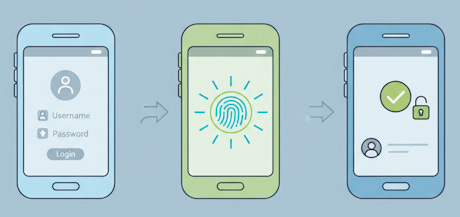
Here’s what’s actually happening: over 6 billion passwords are floating around on the dark web right now. Hackers don’t need to be geniuses anymore. They just buy your password from the last data breach and try it everywhere. If you’re using “Fluffy2019!” for both your email and your bank, you’re in trouble.
Passkeys solve this mess entirely. They’re a new way to log into websites and apps without typing a single password. No memorizing, no writing passwords on sticky notes, no getting locked out because you can’t remember if you used an exclamation point or a question mark.
Join TheSeniorTechie and help make technology accessible for every senior. Paid subscribers get full access to Premium Guides plus LIFETIME access to free tech support from our partner Tech Maid - while supporting our mission to reach more seniors who need it.
What Exactly Is a Passkey?
A passkey is a digital credential that replaces your password using cryptographic keys instead of characters you type. When you create a passkey for a website, your device automatically generates two mathematically linked keys: a public key that goes to the website’s server, and a private key that stays locked on your device.
Think of it like having two puzzle pieces. The website keeps one piece, your phone or computer keeps the other. When you want to log in, these pieces confirm they match without ever showing each other the full picture.
The private key never leaves your device. It’s stored in ultra-secure hardware like Apple’s Secure Enclave, Windows TPM, or Android’s dedicated security chip. Even if the website gets hacked, thieves only get the public key, which is useless without your private key.
How You Actually Use Them
Creating a passkey takes about five seconds. You visit a website that supports passkeys, click “Create a passkey,” and your phone or computer asks you to verify it’s really you using Face ID, fingerprint, or your device PIN. That’s it. No picking a password, no confirming it twice, no special characters required.
Logging in is even faster. You go to the website, it recognizes your device, and you simply unlock with your face or fingerprint. The two cryptographic keys confirm each other behind the scenes. You’re in.
Why Passkeys Beat Passwords for Security
Passkeys can’t be phished. When a scammer sends you a fake email pretending to be your bank, and you click their convincing lookalike website, a passkey simply won’t work there. The cryptographic keys are tied to the real website’s address. There’s no password to type in the wrong place.
They’re also impossible to guess or steal in the usual ways. No one can shoulder-surf your passkey at the coffee shop. No malware can log your keystrokes because you’re not typing anything. And since each passkey is unique to each website, a breach at one site doesn’t endanger your other accounts.
The Phishing Protection That Actually Works
83% of people abandon creating new accounts because password requirements are so annoying. But the real danger isn’t the annoyance; it’s that complicated passwords create a false sense of security. “MyD0g&2024!” feels secure, but it falls apart the moment you type it into a fake website.
Passkeys eliminate this entirely because authentication happens between your device and the real server using cryptographic proof. Even if you wanted to give your passkey to a scammer, you couldn’t. It’s not something you can write down or speak out loud.
Making the Switch Without Losing Your Mind
You don’t have to convert everything overnight. Start with one or two important accounts that support passkeys—Google, Microsoft, Apple, PayPal, and many banks already offer them.
When you create a passkey, most services let you keep your password as a backup initially. This gives you time to get comfortable with the new system without fear of being locked out.
Your passkeys automatically sync across your devices through your Apple iCloud Keychain, Google Password Manager, or Microsoft account. Set up a passkey on your phone, and it works on your tablet and computer too. No manual copying or confusing setup.
What If You Lose Your Device?
This is the question everyone asks. If your passkey is on your phone and your phone falls in a lake, you’re not locked out forever. Your passkeys sync to your other devices in the same ecosystem. iPhone users have them backed up to iCloud, Android users to Google account.
Plus, you can create passkeys on multiple devices for the same account. Keep one on your phone and one on your computer. Most services also maintain traditional recovery methods, such as email verification and backup codes, for extreme situations.
The Technology Major Companies Trust
Microsoft strongly recommends passkeys for all personal and work accounts, calling them faster and more secure than passwords with additional authentication. Apple built passkey support directly into iOS, iPadOS, and macOS. Google made them the default sign-in option for Google accounts.
These aren’t experimental features. Passkeys are based on FIDO standards developed by the FIDO Alliance, an industry group that includes Apple, Google, Microsoft, Amazon, and hundreds of other tech companies working together.
The technology works across devices and platforms. You can create a passkey on your iPhone and use it to sign into a website on your Windows laptop. The standards ensure everything talks to each other properly.
Beyond Just Tech Giants
Banks, healthcare portals, shopping sites, and streaming services are rapidly adding passkey support. The transition is happening now, not five years from now. Every major password manager—1Password, Dashlane, Bitwarden—now stores and manages passkeys too.


How does another person (my spouse, say) get into my accounts if I am incapacitated-hospitalized, dead??