

Your mom has a smart doorbell. Your dad wears a fall detection watch. You’ve installed motion sensors in the hallway and a voice assistant in the kitchen.
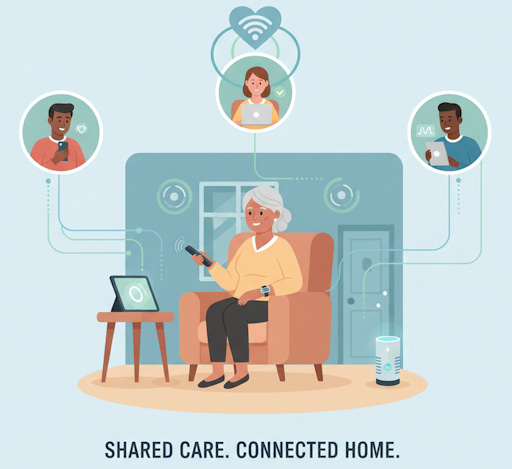
But who saw that he didn’t get out of bed until 2 PM yesterday? Who knows your sister already checked on the stove alert? Who’s tracking whether anyone followed up on that low heart rate notification last Tuesday?
Most smart home setups for aging parents operate like isolated islands. Each device does its job, but nobody’s connecting the dots. That’s the problem a family console solves. It’s not another gadget for your parents to learn. It’s a coordination hub for the people helping them stay home safely.
Join TheSeniorTechie and help make technology accessible for every senior. Paid subscribers get full access to Premium Guides plus LIFETIME access to free tech support from our partner Tech Maid - while supporting our mission to reach more seniors who need it.
What Actually Is a Family Console
Think of it as mission control for aging in place.
A family console is a shared digital platform where multiple family members see the same information from your parents’ smart home devices. Motion sensor data, medication reminders, door lock status, temperature readings, emergency alerts. Everything flows into one dashboard that siblings in different time zones can access simultaneously.
Caring Village offers exactly this kind of coordination. Their free app includes shared calendars, task assignments, and wellness journals that up to two family members can access. The premium version runs $14.99 per month (billed annually) for up to 5 people and adds features like external calendar integration and customizable care plans. For families managing care across multiple states, that’s less than one tank of gas.
Some systems send notifications to everyone at once when something needs attention. Others let you assign tasks, like “check on Dad’s lunch” or “call about that late-night bathroom trip.” The goal isn’t surveillance. It’s making sure someone’s always paying attention without burning out any single caregiver.
The Coordination Problem Nobody Talks About
When three siblings share caregiving duties, the real challenge isn’t installing devices. It’s knowing what everyone else already knows.
Your brother drives over because he got a door sensor alert, not realizing your sister already called and everything’s fine. Meanwhile, nobody notices that Mom hasn’t opened the refrigerator since breakfast because each of you thought someone else was handling it. This fragmented awareness creates gaps where emergencies slip through.
A shared console eliminates the constant group text threads. Instead of “Did you hear from Dad today?” messages bouncing around, everyone sees his activity patterns in real time. Movement in the kitchen at 7 AM. Front door opened at 10. Medication dispenser accessed at noon. When patterns break, everyone knows at once.
Building the Social Infrastructure
Smart home coverage obsesses over which sensor detects falls fastest or which camera has the clearest night vision. That’s backwards.
The technology only works when the human network behind it functions smoothly. A family console creates structure for that human network. It answers: Who responds to alerts? What counts as an emergency? When should we escalate to a professional caregiver or 911?
Setting Up Response Teams
Effective family consoles let you create escalation protocols. Maybe your sister who lives closest gets motion sensor alerts first. If she doesn’t acknowledge within 20 minutes, the notification goes to you. If nobody responds within an hour, it contacts a neighbor or professional caregiver.
This prevents both overreaction and dangerous delays. Not every alert demands a frantic phone call. But every alert needs someone who’s responsible for evaluating it. The console makes that responsibility visible and trackable.
Caring Village’s AI assistant “Julia” helps with this by delivering tailored reminders and care suggestions based on your family’s actual usage patterns. If your mom typically takes medication at 8 AM and nobody’s checked in by 8:30, Julia can prompt whoever’s on duty that morning. It’s automated accountability without feeling robotic.
Beyond the Notification Flood
Your mom’s motion sensors could ping you every time she walks to the bathroom at 3 AM. But you don’t need that. What you need is an alert when there’s NO motion detected for 12 hours during daytime. Or when motion happens in an unexpected pattern, like the front door opening at 4 AM.
Good consoles let you define what’s normal for your parent’s routine, then only alert when something deviates. They track baseline patterns automatically. If Dad usually makes coffee between 6 and 7 AM, the system learns that. When he doesn’t, it flags the change.
Philips Lifeline’s HomeSafe system with AutoAlert automatic fall detection monitors for falls without requiring your parent to press a button. When the device detects unusual movement patterns, it contacts both emergency services and your family’s designated contacts simultaneously.
The Dashboard Your Siblings Actually Check
A family console only works if people use it. That means design matters more than features.
The best platforms show you what you need in under five seconds. Green checkmarks for normal activity. Yellow flags for minor concerns. Red warnings for immediate attention. You shouldn’t need to interpret graphs or scroll through logs to know if your parent had a normal Tuesday.
Daily Patterns Without the Creepiness
There’s a fine line between helpful monitoring and invasive surveillance. Your parents don’t want their kids tracking bathroom breaks or watching them through cameras.
Smart consoles can show activity without showing behavior. Instead of “Mom spent 10 minutes in the bathroom,” it shows “normal movement patterns detected throughout home.” Instead of camera feeds, it shows “front door visitor at 2:30 PM” with the option to review footage only if needed.
This respects privacy while maintaining safety. Your parents keep their dignity. You get peace of mind. The system only escalates detail when something seems wrong.
CareZone, a completely free app, emphasizes this privacy-respecting approach. Family “helpers” can share task lists, health journals, and medical information without constant surveillance. The app doesn’t include appointment reminders, which some find limiting, but its zero-cost structure and focus on essential coordination makes it accessible for families on tight budgets.
Long-Distance Caregiving Gets Less Impossible
Managing aging parents from another state feels like trying to drive a car using only a rearview mirror.
You call daily. You visit monthly. But you have no idea what happens in the hours and days between. Did Dad eat anything besides crackers yesterday? Has Mom been outside this week? A family console fills those blind spots without requiring constant check-in calls.
What Remote Siblings Can Actually See
Modern platforms integrate data from multiple device types. Smart refrigerators track when doors open. Stove monitors show cooking activity. Medication dispensers confirm pills were taken. Wearables share step counts and sleep quality. Motion sensors map movement through the home.
The Claris Companion tablet was built specifically for this use case. At $349 upfront plus $49 monthly for cellular service (or $329 and monthly $29 for WiFi-only), it provides a simplified interface with large icons and voice controls your parents can actually use. The companion app lets you and your siblings remotely monitor usage, send messages, and receive alerts for missed medication or check-ins. It’s essentially a two-way console—your parents get easy video calls and health tracking, while you get oversight of their daily patterns.
Your console aggregates all this into readable summaries. “Thursday: Normal activity levels. All medications taken on schedule. Two cooked meals. 15-minute walk outside. Visitor at 3 PM (recognized as nurse aide).” That one-sentence summary takes 30 seconds to read and tells you more than a 20-minute phone call.
When you DO call, you’re asking better questions. Not “How are you feeling?” but “I noticed you were up a lot last night. Is the arthritis bothering you again?” The conversation becomes more specific and more helpful.
The Technology Behind the Team
Family consoles work by pulling data from multiple smart home ecosystems into one interface.
Most platforms support devices across brands. Your Ring doorbell talks to your Alexa motion sensors talks to your Apple Watch talks to your Nest thermostat. The console sits on top of everything, translating different systems into one shared language your family understands.
Integration Without the Headache
Setting this up used to require a computer science degree. Now, most consoles walk you through device pairing with step-by-step guides. You scan QR codes or tap “connect” buttons. The system discovers compatible devices automatically.
The technical term is “interoperability,” but what it means practically is this: you don’t need to replace all your parents’ existing smart home devices to use a family console. You connect what they already have, fill gaps with new devices as needed, and let the platform handle the rest.
GrandPad takes a different approach by offering a closed ecosystem that deliberately limits what your parents can access. At $399 plus $25 monthly for service), it provides unlimited data without the security risks of open internet access. Your parent can’t accidentally download malware or fall for phishing scams because they can only access pre-approved apps and contacts. Family members control everything remotely through the companion portal. It’s more restrictive but significantly safer for parents with cognitive decline.
Starting Without Overwhelming Your Parents
The worst smart home mistake is installing 15 devices in one weekend and expecting your 78-year-old mother to adapt by Monday.
Effective implementation happens gradually. Start with one or two devices that solve obvious problems. A video doorbell so she can see who’s there before opening the door. A voice assistant so she can call you hands-free. Once those feel normal, add more.
The First 30 Days Matter Most
Your parents don’t need to interact with the family console. That’s your tool, not theirs. But they do need to trust that the devices in their home aren’t spying on them or making their lives harder.
Have a conversation before installing anything. Explain what each device does and what information it shares. Show them the console dashboard so they see it’s activity monitoring, not behavior surveillance. Give them the ability to pause sensors if they want privacy during certain hours.
Check in frequently during the first month. Are the notifications too sensitive? Too rare? Is the voice assistant responding reliably? Does the motion sensor placement miss important areas? Adjust based on real experience, not assumptions about what should work.
For parents completely new to technology, a senior-specific tablet creates a gentler entry point. The GrandPad includes 24/7 white-glove support, meaning your parents can call anytime for help. That takes pressure off you to troubleshoot every technical hiccup and gives them confidence they won’t break anything by pressing the wrong button.
When Professional Care Joins the Team
As needs increase, many families bring in paid caregivers, visiting nurses, or home health aides. A family console makes these transitions smoother.
Professional caregivers can get limited access to the console, seeing only information relevant to their work. The nurse checking on wound care sees medication tracking and vital signs. The aide preparing meals sees kitchen activity and dietary notes. They can log their visits and observations directly into the system.
One System for Family and Professionals
This eliminates the notebook-on-the-kitchen-counter approach where everyone scribbles updates that may or may not get read. Digital logs are timestamped, searchable, and accessible to everyone with permission. When the doctor asks about medication adherence over the past two weeks, you pull up the report in 10 seconds.
The console also protects your parents during caregiver transitions. When one aide leaves and another starts, the new person can review weeks of activity logs to understand routines and preferences quickly. There’s less disruption to care quality.
Caring Village explicitly designed their Professional tier for this scenario, offering care agencies a way to coordinate with families while maintaining appropriate privacy boundaries. Home health workers document their visits, families see confirmation that care happened as scheduled, and everyone avoids the communication gaps that lead to duplicated effort or missed tasks.
Hidden Costs Worth Considering
Monthly subscription fees are predictable. What catches families off-guard is the time investment. Someone needs to manage the console: reviewing activity, responding to alerts, adjusting settings, troubleshooting device issues. That responsibility typically falls to one family member, creating a new form of caregiver burden if not distributed intentionally.
Compare those numbers to one month in assisted living, which averages over $4,500. Or the cost of emergency room visits prevented by catching health issues early. For families trying to extend aging in place by even one year, the return on investment usually makes sense.
There’s also the upgrade treadmill. Devices get discontinued. Software updates change interfaces. New capabilities emerge that make older equipment obsolete. Budget for replacing 20% of your smart home devices every two years.
Making Aging in Place Actually Sustainable
Smart homes don’t prevent aging. Your parents will need more help over time, not less.
What a family console does is stretch the timeline. It catches small problems before they become crises. It distributes caregiving across more people so nobody burns out. It creates visibility that helps families make informed decisions about when to increase support and what kind.
The goal isn’t keeping your parents in their home forever at any cost. It’s keeping them there safely for as long as that genuinely serves their wellbeing. The console helps you recognize when you’re crossing from “this is working” into “this is becoming dangerous.” That awareness is valuable even if the answer eventually becomes transitioning to a higher level of care.
Remote patient monitoring platforms like Claris Healthcare show what’s becoming possible as these technologies mature. Their system serves over 130 organizations and treats social isolation as a chronic condition requiring active management. Daily check-ins, family portal access, virtual group activities, and medication reminders create a web of connection that makes aging in place less lonely and more sustainable. As of early 2026, these integrated approaches are moving from specialty healthcare settings into ordinary family homes.


Though the thought of one more device is less than exciting -- this one really caught my attention. It can allow for a greater peace of mind for all: community, friends, and family -- as well as those of us who want to age in place. I will be reading/researching more about this as time goes on. As always, thank you for sharing valuable information.