

A screen that receives family messages without demanding a reply may suit you better than another phone or tablet.
Someone texted you tomorrow’s pickup time, but now you can’t find the message. A caregiver-managed digital message board keeps that information visible, without another app to open. You’ll learn when this approach makes sense and which products deserve consideration.
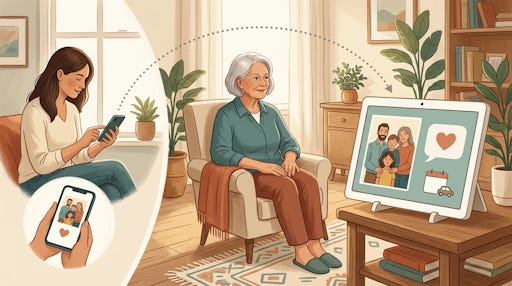
A digital message board for seniors is a screen that shows notes, reminders, and photos. Someone manages messages remotely, while you simply read the screen. Memoryboard puts that exchange first; other products combine it with calendars, clocks, or video calling.
The distinction matters when you’re deciding what to buy:
A photo frame primarily shares pictures; choose a message board when written instructions matter.
A basic day clock identifies the day and time; a message board adds personal updates.
A general-purpose tablet offers more activities, but you may want fewer things to operate.
Would your day feel easier if tomorrow’s plans stayed beside your favorite chair?
An adult child, a spouse, or a professional caregiver might purchase one. You could also buy your own and invite someone to help. The practical requirement is a willing person who’ll keep information current.
Before shopping, name one missed message you want to prevent. If calls, texts, or a paper calendar already work, there’s no need to replace them.
Get everything TheSeniorTechie offers with our Premium membership: monthly Brain Health and AI For Seniors Deep Dives, step‑by‑step Premium Guides, and lifetime TechMaid support (a $50/year service, included at no extra cost). You also won’t see this message.
What Does Memoryboard Put On Your Screen?
Memoryboard centers its design on messages, reminders, and photos sent from someone else’s phone. You don’t need to tap or swipe to receive them. That makes it a sensible starting point when communication, rather than timekeeping, is your main concern.
Its two models have the same features:
The 10.1-inch display costs $175.
The 15.6-inch display costs $275.
Both use the free iPhone or Android app, without a subscription.
Someone plugs the board into power, connects it to Wi-Fi, and installs the app. Family members and caregivers can join its Care Circle to contribute. The company places no limit on that number.
You can schedule recurring reminders for appointments, meals, and activities. Photos and personal notes can appear alongside practical information, so the screen needn’t become an endless list of instructions.
Suppose you’re waiting for a ride and starting to feel anxious. A message saying, “Your appointment is Thursday; pickup is at 10,” could answer the immediate question.
Which room would you actually notice it in?
Choose the size after checking viewing distance, available space, and glare. Ask to see a demonstration using text as long as your usual messages. Memoryboard advertises a 120-day return period, giving you time to judge whether it suits your household.
How Does myhomehelper Handle Daily Communication?
myhomehelper combines messages with a daily or weekly diary, reminders, photos, and automatically answered video calls. Its supplied 10.1-inch tablet requires no interaction for those features to appear.
Your helper manages it through a web control panel. Timed reminders can repeat and stay visible for a chosen duration. You can add an image or attention sound. Optional response buttons let someone who can use them reply to a reminder.
The calendar clock’s components can be switched on or off. That flexibility matters if a crowded display leaves you feeling annoyed rather than informed.
For example, your helper could show today’s visitor and a captioned family photo. There’s no obligation to display every available feature.
Published UK pricing starts at £199.99 before VAT, including one month’s service. Afterward, that plan costs £9.99 monthly before VAT. Other subscription arrangements are available.
The company accepts overseas inquiries and lists £25 international delivery. However, I couldn’t verify explicit U.S. shipping confirmation or a final U.S. price. Email info@myhomehelper.co.uk before ordering; ask about delivery, power compatibility, and returns.
The tablet needs continuous power and an internet connection for updates. You can’t install the full product on your own tablet. If you cancel service, its existing display continues, but online messaging and remote changes stop.
Could Memaxi Use Your Existing Tablet?
Memaxi HOME takes a software approach. You supply an iPad or Android tablet, install Memaxi Display, and place it where you’ll see it. Your helpers use Memaxi Connect or its website to update information remotely.
The display combines a calendar, notes, captioned photos, and video calling. Notes can remain visible for several days. That suits information such as “The plumber comes Friday,” rather than another brief notification that disappears before you notice it.
Have you got a spare tablet sitting unused in a drawer?
Check compatibility before assuming it’ll work. You’ll also need someone comfortable maintaining that tablet. On an iPad, Apple’s Guided Access can restrict the device to one app, which may prevent accidental departures from the display. Apple notes that emergency calls are not available while Guided Access is running, so end the session first if you need to make one.
Memaxi publishes a free HOME plan and paid plans at €19.99 or €29.99 monthly. Its free plan lists limits of three caregivers, ten photos, and five video calls monthly. Those are euro prices, not verified U.S. quotes.
Ask Memaxi about current U.S. availability and support before paying. Consider this option if you want shared scheduling and family communication together. It requires more equipment decisions than buying a ready-made display, so test the free plan before purchasing a tablet specifically for it.
When Would A Dementia Clock Fit Better?
Idem and RecallCue deserve consideration, but their starting point differs. Both lead with a dementia/day clock; messaging adds to that time-and-date function. Compare them when knowing the day and what happens next matters most.
The Idem Smart Clock costs $275 and has a 10.1-inch screen. Helpers can remotely manage reminders, notes, events, and messages. Read-aloud prompts and optional yes/no confirmations add ways to receive and acknowledge information.
Core Wi-Fi use requires no subscription. Optional cellular service costs $9 monthly or $99 yearly. Video calling requires a separate Premium subscription.
RecallCue runs on your iPad or Android tablet. Its free plan provides a day clock. Pro adds remote messages, photos, reminders, music, and video calls for $9.99 monthly or $99.99 annually in the U.S. App Store.
Try the display format before committing. Can you comfortably find the personal message among the clock information?
A screen can support a routine, but a displayed medication reminder doesn’t prove you took anything. Discuss concerning memory changes with your clinician; the National Institute on Aging explains why that matters.
Common Questions About Digital Message Boards for Seniors
Q: Can visitors read personal messages?
A: Digital message boards show information openly. Avoid displaying account numbers or sensitive medical details.
Q: Should you enable automatic video answering?
A: Automatic video answering needs your agreement. Discuss privacy and approved callers before enabling it.
Q: Do digital message boards need Wi-Fi?
A: These boards receive messages over the internet, so you need a working connection. Memoryboard connects to Wi-Fi, and Idem also offers an optional $9 monthly cellular plan for homes without reliable Wi-Fi.
What single message would you most like to keep visible tomorrow?

