

Your prescription changed at Tuesday’s appointment. The old instructions are still on your phone, someone helping you has a different list, and now you’re wondering which version to trust.
A pill reminder won’t fix that.
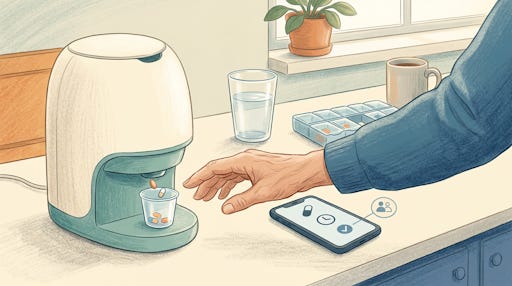
Medication management technology now reaches beyond alarms. Tools such as SeniorThrive and Elderella connect medication information with other parts of your care. Smart dispensers such as Hero help with the physical business of sorting and releasing pills.
The useful question isn’t which product has the most features. It’s which one addresses your daily worry without creating another chore.
Stay confident with your tech, and keep your mind sharp. Premium subscribers get every Premium Guide, exclusive Brain Health and AI For Seniors Deep Dives, and full access to TechMaid for lifetime tech support (normally $50/year—yours free). You also won’t see this message.
What can newer medication tools actually do?
Have you ever dismissed a reminder, answered the phone, and forgotten why the reminder rang?
An alarm handles timing. It doesn’t necessarily handle remembering what happened afterward, updating instructions, or keeping helpers informed.
Today’s tools tackle several different jobs:
Reminding you when a dose is scheduled.
Recording doses you mark as taken.
Turning prescription-label photos into medication entries.
Sharing updated information with people helping you.
Sorting and dispensing pills according to an entered schedule.
These are different capabilities, not interchangeable promises. An app that organizes information won’t physically prepare your pills. A dispenser won’t decide whether a newly prescribed medicine is appropriate.
Before choosing anything, finish this sentence: “The medication task that worries me most is…”
Perhaps you forget doses. Perhaps you’re tired of repeating instructions to three people. Perhaps small labels and several bottles make mornings frustrating.
Start there.
The product descriptions below reflect the companies’ published features, not hands-on testing or proof that they prevent medication errors. Treat them as options to investigate, not endorsements.
Your first practical step is to gather your current instructions and ask your pharmacist about any discrepancies. Accurate information needs to come before clever software.
How does SeniorThrive connect medicines and safety?
SeniorThrive takes a broader approach than a stand-alone pill reminder. Its platform combines medication management with wellness tracking, home safety features, and family coordination.
Why might that matter to you? Because medication concerns don’t always stay neatly inside a pill bottle.
SeniorThrive says its Medication Tracker draws information from FDA.gov and flags potential medication risks, including medicines associated with dizziness or increased fall risk. It also advertises medication reminders.
Suppose you’ve started feeling unsteady when getting out of your chair. That’s something to discuss with your clinician or pharmacist, not simply dismiss as another birthday arriving.
A medication-related flag could give you a specific question to bring to that conversation. It cannot establish what caused your symptoms.
SeniorThrive also offers an Emergency Card containing conditions, prescriptions, and contacts, intended for your refrigerator or phone wallet. That’s a separate, practical use for the information you enter.
Before signing up, ask:
What medication information must you enter yourself?
How do you update a changed prescription?
Who can see your information?
What does a safety alert actually check?
References to FDA information don’t mean the FDA has endorsed the product.
Ask for a demonstration using your actual concerns. You’re evaluating whether the service helps you manage daily life, not whether its feature list sounds impressive.
How does Elderella organize medication changes?
Elderella focuses on coordinating care information among you and the people helping you.
Its medication features include photographing a prescription label or pill pack. The company says the software extracts the medication name, dose, and schedule, reducing manual typing.
That could help when a bottle’s label contains more tiny printing than you care to tackle.
But check every extracted detail against the prescription instructions before relying on it. A convenient shortcut still needs your attention.
Elderella also offers scheduled reminders, a record built from doses checked off, and a shared medication list. Its conversational assistant, Ella, can answer questions using information in the care record.
Imagine returning from an appointment with changed instructions. Rather than explaining the change through several messages, you could update one shared record.
Would that remove some of the repeated “What did the doctor say?” conversations from your week?
Elderella says it also flags potential drug interactions when you add medications. Use those flags to start a conversation with your pharmacist, not to make treatment changes yourself. No flag should persuade you that every possible concern has been ruled out.
Try entering one medication first. Check the result, set a reminder, and ask a helper to confirm what they can see before moving your whole routine into the system.
When would a smart dispenser help more?
If your hardest task is physically organizing pills, another app may miss the point.
Hero combines a countertop dispenser with a connected app. According to its current specifications, the machine stores up to 10 different medications in separate cartridges.
You enter the medication schedule and load each medicine into its assigned container. At the scheduled time, Hero signals with sound and light. Pressing its button starts dispensing the scheduled pills into a cup.
That’s different from filling each compartment of a weekly organizer yourself.
Still, somebody must load the correct medicines and enter the correct instructions. A dispenser doesn’t remove those responsibilities.
Hero also doesn’t accommodate every medication. Its published exclusions include liquids, half pills, and medicines requiring refrigeration. Ask the company and your pharmacist about your particular prescriptions before ordering.
Before buying equipment, request answers about:
Total costs, subscriptions, and return conditions.
Loading, cleaning, and prescription changes.
Power failures and connection problems.
Travel arrangements and access to your medicine.
Also ask what the system records. “Dispensed” means the machine released pills. It doesn’t prove you swallowed them.
Could MedaCube handle a more complicated schedule?
If you take several different pills, MedaCube offers another countertop option. The company says it holds up to 16 different medications, with storage lasting up to 90 days depending on your doses and schedule.
You load each medicine into a separate labeled compartment. The machine then prepares scheduled doses, rather than requiring you to sort pills into individual morning and evening slots.
Its features include:
A locking design with a tamper alarm.
Automatic photographs of dispensed doses for later review.
Caregiver alerts about late or missed doses.
Battery backup for power interruptions.
That photograph provides a record of what the machine dispensed. It doesn’t establish that you swallowed the pills.
MedaCube advertises no monthly membership fee, but ask about the equipment price and any optional connectivity charges. Have the company confirm that your particular pills will work before ordering.
Would less frequent loading help you, or would a larger machine create another complication? Ask to see the entire loading and dispensing process, not just a demonstration of its easiest button.
Would MedMinder take sorting off your hands?
MedMinder offers a different approach: a connected pill organizer paired with a pharmacy service that can deliver medication trays already organized by dose time.
Instead of pouring separate medicines into storage bins, you place the prepared tray into the dispenser. When a dose is due, the appropriate compartment blinks, helping you find your scheduled pills.
The company also offers reminders, remote monitoring, and caregiver notifications. It says the dispenser doesn’t require home Wi-Fi setup.
This may interest you if filling an organizer has become the most frustrating part of your routine. But pharmacy-prepared trays introduce another question: what happens when your prescription changes halfway through the month?
Before enrolling, ask:
Does the pharmacy serve your address and accept your insurance?
Which prescriptions can it package?
How do urgent medication changes reach you?
What will you pay for the service and dispenser?
Make sure the answers fit your care, not just the sales demonstration.
How do you choose without adding work?
Choose the smallest amount of technology that handles your actual problem.
If remembering is difficult, start with reminders and logging. If information keeps getting scattered, investigate shared-care tools. If organizing pills is the struggle, investigate dispensing equipment.
For a simpler option, Apple’s Health app provides medication scheduling and logging on your iPhone. Apple explains its features on its medication setup page.
Don’t move everything at once. First, have your medication list checked. Then test reminders and recordkeeping without changing your prescribed routine.
Keep a paper backup containing prescriptions, over-the-counter medicines, vitamins, and supplements. The National Institute on Aging’s medication safety guide explains what to include.
If you’re unsure whether you took a dose, don’t let a blank app entry decide. Follow the medicine’s instructions or contact your pharmacist.
Frequently Asked Questions
Q: Can I use these tools for someone else?
A: Caregiving arrangements need agreement about access, responsibilities, and privacy. Check each service’s permissions before entering another person’s information.
Q: Should I crush pills to fit a dispenser?
A: Crushing requires your pharmacist’s approval. Never alter a medicine simply to accommodate equipment.
Q: What should I ask about subscriptions?
A: Subscriptions deserve a clear explanation of cancellation terms, equipment obligations, and access to your records after cancellation.
Which medication task would you most like to stop worrying about?

