

For years, scams relied on sloppy spelling, strange wording, and obvious fake emails. Many people could spot those at a glance.
AI changed that.
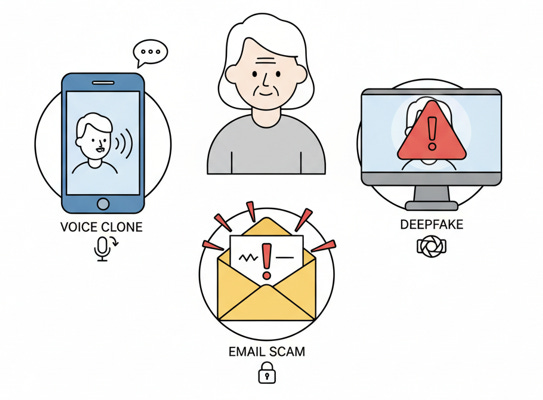
Modern AI systems can now:
Copy a person’s voice from just a few seconds of audio
Generate realistic photos and videos of people saying or doing things they never did
Write emails and text messages in natural, polished language, tailored to your life
This means a scam can sound like your family member, look like a trusted official, and read like a real company message. That is the specific risk AI introduces.
Enable a senior’s learning about AI and health-related technology, digital independence, and more with your support.
AI Voice Cloning and the “Grandparent Scam”
The traditional “grandparent scam” involved a stranger pretending to be your grandchild on the phone. Often the voice did not sound quite right, which gave people a chance to hesitate.
AI voice cloning removes that warning sign.
With only a short clip of your grandchild speaking, taken from a public video or social media, AI can create a voice that sounds extremely similar. Scammers then call you using that cloned voice, often in a panic, asking for money for bail, hospital bills, or emergency travel costs.
Key AI-specific warning signs:
The call is unexpected and urgent, often at odd hours.
The “grandchild” begs you not to tell their parents.
Payment is requested in ways that are hard to reverse, such as wire transfer, gift cards, or cryptocurrency.
Practical protection:
Hang up and call your grandchild or another family member on a known number.
Agree with your family on a “secret word” that must be used in any real emergency call.
Treat any urgent money request over the phone as suspicious until confirmed independently.
Deepfakes: When Seeing and Hearing Are Not Enough
Deepfakes are AI-generated or heavily altered videos and audio. They can show a person saying things they never actually said, with lip movements and expressions that match.
Scammers use deepfakes in several ways:
Fake “investment” videos where a public figure appears to endorse a scheme
Fabricated video messages claiming to be from a company executive, charity leader, or religious figure
Manipulated clips on social media that try to steer you to a fake website or donation page
Why this is different from old scams:
The video quality is high, not grainy or obviously edited.
The voice and face move together realistically, which makes it feel genuine.
Practical protection:
Do not trust a video or audio alone, especially if it asks for money or personal information.
Go directly to the official website of the company, charity, or organization rather than clicking links in the video description.
If a video seems shocking or “too good to be true,” assume it could be altered and verify through a second, independent source.
AI-Written Messages and Fake “Official” Emails
In the past, scam emails were often easy to spot: poor grammar, strange phrases, and generic greetings.
AI language tools now let scammers:
Write convincing emails in clear, natural English
Personalize messages using details about you gathered from data breaches or public profiles
Copy the tone and formatting of banks, delivery companies, or health providers
What problem does this create?
Your usual “this sounds odd” reaction may not trigger, because the email looks and reads like a real one. It may even mention your city, your bank, or a recent purchase.
Warning signs, even with AI-polished text:
Requests to “verify” personal information or passwords
Urgent language about accounts being closed, benefits being denied, or packages being held
Links that, when hovered over, show a slightly different website address than the company’s real site
Practical protection:
Do not click links in unexpected emails. Instead, type the company’s web address into your browser yourself.
Never reply to an email with sensitive information (passwords, full Social Security number, bank details).
If in doubt, call the company using a phone number from a statement or their official website.
AI and Fake Websites That Look Perfectly Real
AI tools make it easier to create professional-looking websites quickly. Scammers can:
Copy the layout, colors, and logos of a real company
Use AI text to fill the site with realistic product descriptions, “FAQs,” and fake reviews
Generate believable photos of staff or “satisfied customers” who do not exist
The result is a site that feels legitimate at first glance.
Where this shows up:
Fake online stores with “too good to be true” prices
Fake investment platforms promising high returns
Fake customer support pages that ask for remote access to your device
Practical protection:
Check the web address carefully; small changes in spelling can indicate a fake.
Be cautious of sites that only accept unusual payment methods, such as gift cards or cryptocurrency.
Search for the company’s name plus words like “reviews” or “scam” to see if others have raised concerns.
AI and Fraudulent “Support” or “Security” Chats
Some scammers use AI chat systems to pose as support agents on fake sites. The chat can:
Answer basic questions clearly
Use your name and details you type in
Steer you toward sharing sensitive information or installing harmful software
This feels more convincing than a simple form or email, because you are interacting in real time.
Practical protection:
Do not let anyone you met through a pop-up or unsolicited chat remotely control your computer.
If you see a security warning that urges you to call a number immediately, close the window and restart your device.
Use support numbers from official paperwork or the back of your card, not from a pop-up message.
A Simple Safety Routine You Can Rely On
You do not need to memorize every type of AI scam. Instead, adopt a short routine whenever money or personal information is involved:
Pause
If a call, email, or message feels urgent, take a breath and slow down. Scammers depend on rushed decisions.Verify on Your Own
Use a phone number or website you already trust, not the one given in the message. Contact the person or organization directly.Limit What You Share
Treat your Social Security number, bank details, and one-time codes as you would your house keys. Only share them when you initiated the contact, and even then, only when necessary.Ask Someone You Trust
Before sending money or giving information, talk to a family member, friend, or advisor. A second pair of eyes often spots problems quickly.
You Can Stay Ahead of AI Scams
AI has made scams more sophisticated, but it has not removed your ability to protect yourself. You still have control over when you respond, what you share, and how you verify.
The core idea is simple: AI can imitate voices, faces, and messages, so you cannot rely on sound, sight, or “professional” wording alone. You rely instead on process:
Pause, verify, and never let urgency force you into a decision.
You do not need to become a technology expert. You only need to treat unexpected requests for money or information with healthy caution. That habit, more than any gadget or app, is what keeps you safe.

