

The problem: falls when nobody’s watching
If you’re reading this, you probably have someone in your life who falls, or you’re starting to worry that you might. The real fear isn’t the fall itself. It’s lying on the floor for an hour, or all night, with nobody knowing.
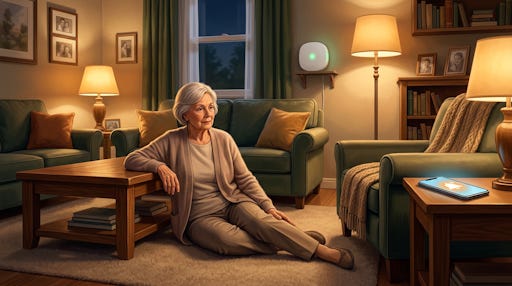
Most “help” buttons and watches have the same flaw: they only work if the person remembers to wear them, charge them, and press the button. A lot of older adults won’t wear them at all. Some can’t. Dementia, Parkinson’s, epilepsy, mobility issues, hearing loss – all of those make “just push the button” a fantasy.
FallGuard takes a different route. It sits quietly in the room, watches for falls using a camera and AI, and alerts family on their phones when something looks seriously wrong – no button, no pendant, no subscription. And for many families, the hardware is provided free.
Become a Paid subscriber and keep your brain sharp with monthly brain health deep-dives and premium tech guides. TechMaid 24/7 tech support (a $50/year value) included.
What FallGuard actually is (plain English)
FallGuard isn’t a necklace or a smartwatch. It’s a camera‑based fall detection system that runs on a small computer (like a Raspberry Pi or an old Windows PC) and watches for sudden changes from “upright” to “on the floor.”
At a high level, it works like this:
A small computer (Raspberry Pi, mini PC, old laptop, or even an iOS device running a detector app) runs the FallGuard Detector software.
A camera, often with night‑vision, is pointed at a “high‑risk” area like a bedroom, hallway, or living room.
The AI looks at body posture and movement over time, not just a single frame. It cares about “did this person go from standing to lying very fast?”
When it sees a likely fall or a “long laydown” (someone down and not getting up), it sends an alert to one or more phones through the FallGuard companion app.
A few key details that matter in the real world:
Not wearable: No one has to remember a device, charge it, or accept something on their body.
Continuous monitoring: The detector is designed to run 24/7 on that one computer or device.
Multiple caregivers: One FallGuard device can be linked to several phones, so a whole care circle can get alerts.
Privacy: The project emphasizes that video is processed on‑device and not stored or uploaded, and the account backend uses Google Cloud security.
It’s a student‑led public‑benefit project, not a giant company. A 13‑year‑old student, Kevin Tang, built FallGuard to protect his grandmother after her fall, and it has grown into a broader initiative providing devices and free software to families.
How FallGuard detects a fall
If you like a bit of under‑the‑hood detail, here’s how the detection logic works, based on public descriptions. Even if you don’t care about AI buzzwords, it’s helpful to know what the system is actually looking for.
Behind the scenes, FallGuard uses computer‑vision tools to track “key points” on the person’s body: head, shoulders, hips, and so on. Those points sit inside a bounding box – basically a rectangle drawn around the person – and the software watches how that rectangle and posture change over time.
Two key ideas drive the algorithm:
Posture/lay-down detection:
It checks if the person has moved into a “laydown” posture using parameters like torso angle (how horizontal the upper body looks) and how the bounding box shifts from tall to wide.
It also looks for long laydowns – someone lying on the ground for an extended period – not just quick motions.
Vertical velocity:
When a laydown is detected, the system looks at the previous second of motion to see if there was a sudden drop in vertical position.
This helps distinguish “I slowly lay on the couch” from “I suddenly hit the floor.”
The algorithm has been tuned over many tests and version updates: thresholds for what counts as a fall have been adjusted, and long‑laydown logic has been refined to cut down on false alarms.
One real‑world example: if someone with Parkinson’s starts walking, stumbles, and ends up on the ground, the system sees a rapid change in height and posture and flags it as a likely fall. If the same person carefully lies down on a bed, the motion is slower and the vertical drop is smaller, so the system is less likely to trigger.
Action step: When you install FallGuard, test it yourself with safe, controlled “falls” onto soft surfaces so you and your loved one understand how it behaves and how alerts show up on phones.
What “free FallGuard” really means
The word “free” gets abused in tech, so let’s be precise about what FallGuard is offering.
FallGuard positions itself as a free fall‑detection device for families in need, not a limited trial and not a paid subscription dressed up in marketing. The apply page explicitly says you can “apply today to protect your loved ones with 24/7 smart fall detection, at no cost to families in need.”
The catch isn’t hidden fees. The catch is supply:
Around 500 families are currently on the waiting list for a FallGuard device.
Each device costs roughly 150–250 dollars in hardware:
Mini computer (Raspberry Pi or similar): 100–150 dollars
Night‑vision camera: 30–50 dollars
microSD card: 5–10 dollars
Power supply and cables: 8–15 dollars
Mounting or case: 1–5 dollars
Software (computer app & mobile app): 0 dollars
In total, building one device usually costs around 150–250 dollars in parts.
Because of this, FallGuard relies on:
Direct donations (e.g., via crowdfunding) to purchase and ship hardware.
Donated unused computers and accessories that can be converted into FallGuard devices.
So “free” here means:
You don’t pay for the device hardware if you’re accepted as a family in need.
You don’t pay ongoing subscription fees for fall detection.
You do need a working internet connection and smartphones for whoever gets alerts.
Action step: If your loved one is at high risk – frequent falls, dementia, epilepsy, living alone – apply sooner rather than later so you’re not starting at the back of a longer line later this year.
How to apply for a free FallGuard
The application process is intentionally simple, but supply is limited, so think of this as getting in line for a safety tool.
Here’s the basic flow, based on the official “Free Apply” page and the main site:
Go to the official application page
Visit fallguard.net and use the “Apply” or “Free FallGuard” link, or go directly to the apply page.
The page clearly states you’re applying “for a free FallGuard device” with “24/7 smart fall detection at no cost to families in need.”
Fill out the application form
The exact fields can change, but you should be ready to provide:Basic contact information (your name, email, phone).
Who the device is for (you, a parent, spouse, child, etc.).
A short description of their fall risk: conditions like Parkinson’s, dementia, epilepsy, recent surgeries, or a history of multiple falls.
Living situation: living alone, with spouse, in retirement community, etc.
Whether you can contribute anything, such as donating hardware or helping fund another device when you’re able.
Submit and wait for follow‑up
Once submitted, your request joins the waiting list. As devices are built (from donations and converted computers), they’re matched to families.
There’s no guaranteed timeline published, so be prepared for a wait, especially with hundreds of families already queued.
Set expectations around support
This is a small, student‑led project, not a big corporate call center, so response times may vary.
If you don’t hear back after a reasonable period, I’d send a polite follow‑up through whatever contact or volunteer links are on the site.
Action step: Before you start the application, write a 3–4 sentence description of your loved one’s situation: diagnoses, fall history, and why a non‑wearable, always‑on system would help. That makes filling the form faster and clearer.
Using your own hardware as FallGuard
One clever angle here: you might not need to wait for a “boxed” device if you already have some old hardware lying around. The software (FallGuard Detector and related tools) can turn a Windows 10/11 PC or compatible iOS device into a monitoring device with a camera.
The FallGuard site describes two related ideas:
Convert unused computers into FallGuard devices
Any computer that can run Windows 10 or 11, connect to the internet, and use a USB webcam can often be turned into a FallGuard device, even if it’s old or slow.
They explicitly mention laptops, desktops, small form factor PCs, mini PCs, Intel NUCs, Raspberry Pi boards, and gear like webcams, power adapters, microSD cards, keyboards, and mice.
Use the detector apps
FallGuard Detector is available as a computer app (for Windows/Raspberry Pi) and as an iOS app that turns an iPhone or iPad into a camera‑based AI fall detector.
The detector app generates a 6‑character code to pair with the main FallGuard companion app, which caregivers install to receive alerts and view events.
If you’re reasonably comfortable with tech (or you have a local volunteer who is), this route can reduce the waiting time and leave donated hardware for families who don’t have old computers.
Basic steps if you go the DIY route (high level):
Pick a room and camera location where falls are most likely and privacy is acceptable (bedroom, hallway, living area).
Set up an old laptop, mini PC, or iOS device on a stable surface or mount it out of the way, with a clear view of walking paths and the bed or favorite chair.
Plug in a USB camera if you’re using a PC, ideally with night‑vision if the room is dark at night.
Install FallGuard Detector from the official download page or App Store and follow the pairing instructions to connect it to the FallGuard companion app.
Run test scenarios: carefully simulate falls and long laydowns so you can tune placement and confirm alerts fire reliably.
Action step: Walk through your loved one’s home and identify two “high‑risk” zones to cover first. Then check if you have old hardware in a drawer that meets the Windows 10/11 + webcam + internet or spare iPhone/iPad requirement.
Who benefits most from a free FallGuard
The stories and examples around FallGuard make it clear who this system is really aimed at. These are the kinds of real‑world situations where a non‑wearable, always‑on fall detector can be a game‑changer:
A wheelchair user with cerebral palsy who occasionally ends up stuck out of the chair with nobody aware.
A person with advanced Parkinson’s who still falls often, refuses or forgets wearables, and needs a system that doesn’t rely on charging or cooperation.
A mom with dementia who has fallen many times in a year, breaking bones, and cannot remember to wear or charge a button or watch.
A senior living alone who wants to pay for their own device and donate one for someone else to stay safe.
Someone recovering from spine surgery with severe pain and limited mobility, where one bad fall could undo everything.
An adult with epilepsy whose seizures prevent them from pressing any button or phone during an event.
A spouse who’s completely deaf at night without hearing devices and needs a phone vibration alert when their partner falls on the way to the bathroom.
A retirement‑community tech committee evaluating FallGuard because residents fear not being found in time after a fall.
If any of those sound familiar, you’re exactly the kind of person this project is trying to help.
Action step: When you apply, explicitly connect your situation to one of these patterns (for example, “My mom has dementia and cannot reliably use a wearable device”). It helps the reviewer understand the stakes quickly.
How you can speed this up for others
This part matters, because it affects how fast those “free” devices reach people. The bottleneck is hardware and time, not software.
FallGuard lists two concrete ways to help:
Donate unused devices
Old laptops (even slow ones), desktops, mini PCs, Raspberry Pis, webcams, power adapters, microSD cards, keyboards, and mice can often be turned into full FallGuard devices.
Instead of sitting in a closet, they can become someone’s 24/7 guardian.
Fund device builds
The project shares a cost breakdown: about 150–250 dollars in hardware per device, depending on parts.
Donations go to mini computers, cameras, storage, power, mounts, and shipping, so another senior doesn’t stay on the waiting list.
You don’t need to be a donor to apply, and you shouldn’t feel guilty if money’s tight. But if you’re in a position to help, funding one device or mailing that old mini PC you never used can directly shorten the wait for another family.
Action step: After you apply, set a reminder to revisit the support page in a month. If FallGuard ends up helping your family and your budget allows, consider donating a bit to “pay it forward” for whoever is still on the list.


This is interesting.