

You’ve done the hard part. Over the past seven weeks (available at TheSeniorTechie.com), you’ve tackled your inbox, sorted your photos, cleaned up your devices, dealt with passwords, and trimmed your social media and subscriptions. That’s genuinely a lot.
But without a simple system, the clutter comes back. Not all at once. Slowly. A few unread emails here. A new app you downloaded and forgot about there. Before long, you’re right back where you started.
That’s not a failure of willpower. That’s just how digital life works. Things pile up unless you have a routine that prevents it.
Ready for the full TheSeniorTechie treatment? Our paid members enjoy monthly brain health deep dives, all Premium Guides, and lifetime TechMaid tech support—a $50/year service included with membership.
The Real Goal Is Maintenance, Not Perfection
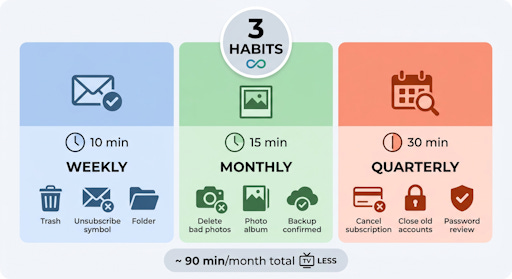
You don’t need a complicated system. You don’t need special software. What you need is three habits, each tied to a time interval: weekly, monthly, and quarterly.
Think of it like maintaining a house. You vacuum weekly, clean the bathrooms monthly, and maybe do a big garage sort once or twice a year. Nobody calls that overwhelming. The same approach works beautifully for your digital life.
The goal isn’t a spotless digital world. The goal is “good enough, most of the time.”
Habit One: The Weekly Inbox Reset
Once a week, spend 10 minutes on your email. That’s it. Not hours. Ten minutes.
Delete anything obviously useless. Unsubscribe from one or two newsletters you didn’t read that week. Move anything that needs action into a simple folder you actually check. Then close it.
You don’t need to reach “inbox zero.” That’s a myth that stresses people out. You just need to prevent the inbox from growing into something that feels impossible to face.
Pick the same day each week. Sunday evening works for a lot of people. So does Monday morning before anything else gets going. The day matters less than the consistency.
Small Acts Add Up Faster Than You Think
Here’s something worth knowing: deleting 10 emails a day adds up to over 3,600 emails a year you’re not hoarding. That’s not a small number.
The same math applies to photos. If you delete 5 blurry or duplicate photos every time you plug your phone in to charge, you’ll clear hundreds of photos a year without ever sitting down for a big photo session.
Small, consistent actions beat big occasional purges every time. The big purges feel good in the moment, but they’re exhausting, and most people avoid them until things get truly out of hand.
Habit Two: The Monthly Photo Check-In
Once a month, take 15 minutes to look at the photos on your phone. Delete the blurry ones, the accidental screenshots, the seven nearly identical shots of the same bird feeder.
Then pick your favorites from that month and move them into a named album. Something like “Spring 2026” is fine. You don’t need a complicated filing system. You just need something that isn’t “Camera Roll: 14,847 photos.”
If you’re backing up to Google Photos, iCloud, or an external drive, confirm the backup ran. It takes about 30 seconds to check. The peace of mind is worth it.
The Backup Check Nobody Actually Does
Most people set up a backup once and then assume it’s working forever. It isn’t always. Apps update, settings change, storage fills up.
Once a month, open your backup app and look for a “Last Backup” timestamp. If it says “Today” or “Yesterday,” you’re fine. If it says something like “43 days ago,” you’ve got a problem worth fixing before something goes wrong.
This is the kind of small check that feels unnecessary right up until the moment it saves every photo you’ve ever taken.
Habit Three: The Quarterly Account Review
Four times a year, block out 30 minutes to do a quick sweep of your digital accounts and subscriptions.
Go through your credit card or bank statement and look for recurring charges. Identify any subscription you haven’t used in the past 30 days. Cancel it. This alone can save most people $20 to $50 a month, sometimes more.
While you’re at it, open your password manager and look for any accounts you no longer use. Close them if you can, or at minimum change the password to something strong and unique so an old forgotten account can’t become a security problem down the road.
Your Three-Habit Cheat Sheet
Pin this somewhere. Tape it to your monitor. Put it in your calendar.
Weekly (10 min): Delete junk email, unsubscribe from one newsletter, clear obvious clutter from your inbox
Monthly (15 min): Delete bad photos, move favorites to an album, confirm your backup ran
Quarterly (30 min): Cancel unused subscriptions, close old accounts, do a quick password manager review
That’s roughly 90 minutes a month total. Less time than one episode of a decent TV drama.
When Life Gets in the Way
You’ll miss a week. Maybe you’ll miss a month. That’s fine. Don’t treat a skipped week as a reason to abandon the whole system.
If you miss your weekly inbox reset, just do it the following week. If you skip a monthly photo review, do two months’ worth in the next session. It won’t take much longer, and you won’t feel like you’ve fallen hopelessly behind.
The system is forgiving because it’s small. That’s the whole point.
One Last Thing Worth Saying
When you started this series, your digital life probably felt like a junk drawer that had gotten out of control. Maybe it felt a little embarrassing, or just exhausting to think about.
The goal was never to turn you into a tech expert. It was to make your phone, your computer, and your inbox feel like tools that work for you, not things you dread opening.
You’ve done the work. Now you just have to keep it from sliding back. Three habits, a little consistency, and the occasional 10-minute cleanup. That’s genuinely all it takes.

