

You open your phone to check one quick thing. Twenty minutes later, you’ve answered two emails, scrolled through a news feed that made you vaguely anxious, dismissed six notifications, and completely forgotten what you originally wanted to do.
That’s not a personal failing. That’s your digital life doing exactly what it was designed to do.
Your Phone Isn’t the Problem
Technology is genuinely useful. It helps us stay connected, manage our health, video call grandkids, and find a good restaurant at 7 p.m. on a Saturday. Smartphone ownership among adults over 50 shot up from 55% in 2016 to 90% by 2025, which tells you something about just how central these devices have become to everyday life.
But useful and overwhelming can coexist. And for a lot of people, the scale has tipped.
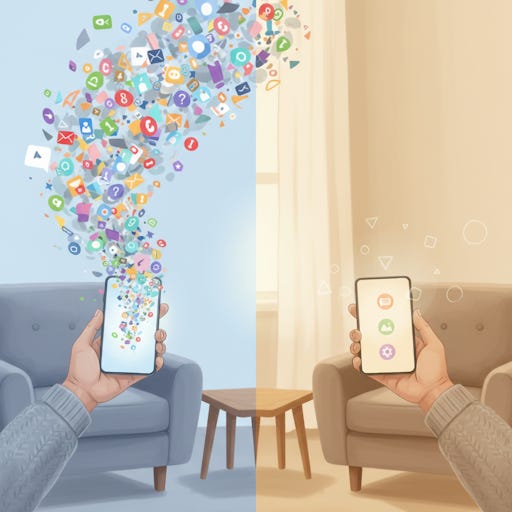
The problem isn’t the phone itself. It’s what’s piled up on it, in it, and around it over the years. Apps you downloaded once and never opened again. A photo library with 4,000 pictures, most of them blurry or duplicates. An email inbox with hundreds of unread messages, many of them newsletters you never signed up for intentionally. Notifications popping up from apps you forgot you had.
Paid subscribers get full access to all Premium Guides (including our monthly brain health deep dive) plus lifetime tech support from our partner Tech Maid (a $50/year value, included for free).
Why It Feels Like Chaos
Here’s something worth understanding: your brain is not wired for this volume of input.
Every notification, every unread email badge, every cluttered home screen is a tiny demand on your attention. Your brain registers each one as something that might need a response. That constant low-level processing is exhausting, even when you don’t realize it’s happening.
Researchers call it decision fatigue. When you’re bombarded with choices -- delete or keep? reply or ignore? tap or scroll? -- your mental energy drains faster than it should. And when your energy is drained, you do what most reasonable people do: you avoid the whole thing. The inbox stays at 847 unread. The photo library keeps growing. The apps multiply.
Avoidance feels like relief in the short term. But the pile doesn’t go away. It just gets bigger.
The Emotional Weight of Digital Clutter
This isn’t just about productivity. There’s a real emotional component to digital overload that doesn’t get talked about enough.
Studies show that 62% of people report stress and anxiety specifically related to digital clutter -- things like an overflowing inbox, disorganized files, and apps left untouched for months. Those micro-stressors add up. A cluttered digital environment can create a persistent background feeling of being behind, disorganized, or out of control.
That feeling is familiar to a lot of people. You know you should go through those photos. You know your inbox is a mess. But the gap between knowing and doing is wide, and every day it doesn’t get done, it gets a little harder to start.
You’re Not Alone in Feeling This Way
Nearly 40% of older adults say they would use technology more if it were simply easier to understand and manage. That’s not a technical skill problem. That’s an overload problem.
The platforms and apps we use are designed to grab and hold attention. Endless scrolling, instant notifications, algorithmic feeds -- these features exist because they work. They keep you engaged, which is great for the app companies and not always great for you.
When you understand that the mess isn’t your fault, it gets a lot easier to start cleaning it up.
What “Digital Decluttering” Actually Means
Digital decluttering isn’t about becoming a tech minimalist or deleting your Facebook account and living off the grid. It’s much simpler than that.
It means making deliberate choices about what stays and what goes in your digital life -- and then building a few small habits that keep things from piling up again. That’s it.
Think of it like cleaning out a closet. You don’t have to throw everything away. You just want to be able to find what you need, feel calm when you open the door, and stop tripping over stuff you don’t use anymore.
The Payoff Is Real, Not Just Theoretical
When people clear out their digital clutter, the effects show up quickly. Focus improves. The background anxiety fades. Devices feel more manageable. Tasks that used to feel like a chore -- checking email, finding a photo, looking something up -- become simple again.
Digital decluttering also restores a sense of agency. Choosing what to keep and what to let go of puts you back in charge of your technology instead of the other way around. That shift in feeling -- from overwhelmed passenger to someone driving the bus -- is worth more than any single tip or trick.
What’s Coming in This Series
Over the next seven weeks, we’re going to work through your digital life one section at a time.
Week 2: Conquering the inbox -- unsubscribing safely, creating folders, and finally making email feel manageable
Week 3: Photos -- deleting duplicates, easy organization, and backing everything up to one place
Week 4: Cleaning up your devices -- removing apps you don’t use, freeing up storage, and calming your home screen
Week 5: Passwords and accounts -- what a password manager actually is, and how to do an annual “account checkup”
Week 6: Social media and paid subscriptions -- unfollowing what drains you and auditing what you’re actually paying for
Weeks 7 and 8: Building simple, sustainable habits so none of this piles up again
None of these weeks requires you to be a technical expert. They’re designed to be done in short sessions, at your own pace, with plain-language explanations.
One Small Thing to Do Right Now
Before next week, try this. Pick up your phone and count how many apps are on it. Don’t delete anything yet. Just count them.
Most people are surprised. The average smartphone has somewhere between 40 and 80 apps installed, and most people regularly use fewer than a dozen. That gap -- between what’s there and what’s actually useful -- is exactly what we’re going to close.
You don’t have to fix everything at once. You just have to start noticing. The rest gets easier from there.

